

HP 6700b TD06 Battery: Specifications, Benefits and How to Choose the Right Replacement
A reliable laptop battery is essential for uninterrupted work, study, and everyday computing. If your HP laptop battery drains quickly, fails to hold a charge, or no longer powers the device properly, replacing it with a compatible battery can help restore its portability and usability.
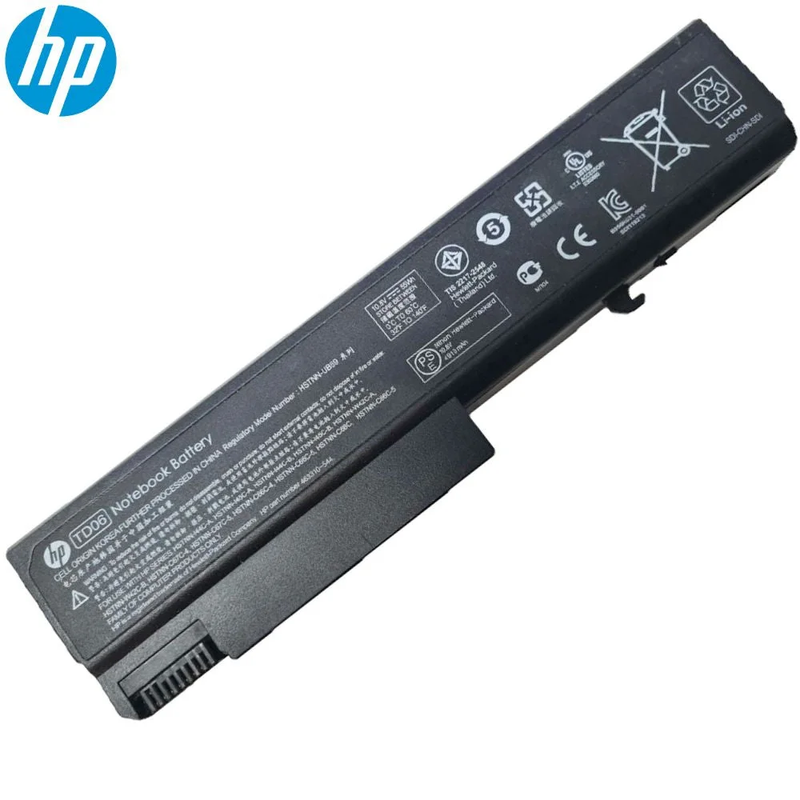
The HP 6700b TD06 Battery, available from Aggarwal Computronix, is listed at ₹2,000, inclusive of all taxes. The product listing identifies it as an original genuine product. Before purchasing, confirm that the battery matches your laptop's exact model and battery part number.
HP 6700b TD06 Battery Specifications
The following specifications are displayed on the product listing:
- Product name: HP 6700b TD06 Battery
- Battery type: Lithium-ion
- Capacity: 4000 mAh
- Voltage: 11.1 V
- Number of cells: 6-cell
- Listed price: ₹2,000, inclusive of all taxes
- Product category: Laptop battery
- Product condition/type: Listed as an original genuine product
Always compare the voltage, connector, physical dimensions, and part number with your existing battery before placing an order. Compatibility should be confirmed for your exact laptop configuration.
Signs That Your HP Laptop Battery Needs Replacement
A laptop battery gradually loses capacity through normal use. Consider checking the battery if you notice any of the following symptoms:
Short battery backup: Your laptop runs for much less time than it previously did, even after a full charge.
Unexpected shutdowns: The laptop switches off when disconnected from the charger, despite showing some remaining battery percentage.
Charging problems: The battery does not charge normally or the percentage remains unchanged for an extended period.
Battery health warnings: Your laptop's diagnostics or operating system reports reduced battery health or recommends replacement.
Physical swelling: A swollen battery is a safety concern. Stop using and charging the laptop, and arrange professional service. Do not puncture, press, or attempt to repair the battery yourself.
Before buying a replacement, check the laptop's battery-health report and charging adapter to rule out other causes.
Why Choose the Correct Replacement Battery?
Selecting a compatible battery is important for safe and dependable laptop operation.
- Correct electrical specifications: Matching the required voltage and supported battery configuration helps avoid compatibility problems.
- Proper physical fit: The battery should fit the compartment and connect correctly without force.
- Suitable capacity: Battery capacity affects potential runtime, although actual backup also depends on workload, battery age, display brightness, and power settings.
- Verified product details: Confirm the battery's part number, condition, warranty, and authenticity with the seller.
- Reliable purchasing support: A knowledgeable supplier can help check compatibility before you order.
Do not select a battery based on the HP brand name alone. Different laptop models can require different battery designs and specifications.
How to Check Battery Compatibility Before Ordering
Follow these steps before purchasing an HP replacement battery:
- Find the exact model number on the laptop's underside or in its system information.
- Shut down the laptop, disconnect the charger, and inspect the existing battery only if it can be removed safely according to the manufacturer's instructions.
- Record the battery's part number and compare it with the replacement listing.
- Verify voltage, connector design, dimensions, and supported laptop models.
- Ask the seller to confirm compatibility if any specification differs or is unclear.
For older laptops, checking the precise battery part number is particularly important because similar model names can use different components.
Tips to Extend Your Laptop Battery's Life
Once you have a suitable replacement, these habits can help maintain battery health:
- Avoid excessive heat and keep the laptop's ventilation unobstructed.
- Use a compatible, good-quality charging adapter.
- Reduce screen brightness when full brightness is unnecessary.
- Close applications and background processes that consume excessive power.
- Install relevant operating-system and manufacturer updates.
- Follow the manufacturer's recommended charging and storage guidance.
Battery performance varies according to usage, temperature, and the laptop's power requirements, so actual backup time will differ between users.
Buy the HP 6700b TD06 Battery from Aggarwal Computronix
Aggarwal Computronix supplies laptop batteries, adapters, screens, docking stations, and other computer accessories. Its product listing for the HP 6700b TD06 Battery displays a price of ₹2,000, inclusive of all taxes.
Before ordering, contact the team to confirm stock availability, exact compatibility, warranty terms, and delivery options.
Product: HP 6700b TD06 Battery
Listed price: ₹2,000, inclusive of all taxes
Website: https://www.aggarwalcomputronix.com/
Product page: https://aggarwalcomputronix.com/laptop-battery/hp-6700b-td06-battery-original
Frequently Asked Questions
What is the capacity of the HP 6700b TD06 Battery?
The product listing specifies a capacity of 4000 mAh, a voltage of 11.1 V, and a 6-cell lithium-ion configuration.
What is the listed price of this HP battery?
The product page displays ₹2,000, inclusive of all taxes. Confirm the current price and availability before ordering.
How can I check whether this battery fits my laptop?
Compare your laptop's exact model number and existing battery part number with the listing. Also verify voltage, connector, and physical dimensions with the supplier.
When should I replace my laptop battery?
Consider replacement if battery backup has significantly decreased, the laptop shuts down unexpectedly, or diagnostics report poor battery health. A swollen battery requires immediate attention and professional handling.
Is this battery listed as an original HP product?
Aggarwal Computronix labels the listing as an original genuine product. Confirm the product's authenticity, warranty, and applicable documentation with the seller before purchase.
Can a new battery guarantee a specific backup time?
No. Runtime depends on battery condition, laptop hardware, software, power settings, and workload. A new compatible battery can improve usability, but a fixed runtime cannot be guaranteed.
Final note: Choosing the correct battery begins with accurate compatibility checks. Verify the part number and specifications before ordering to help ensure a suitable replacement for your HP laptop.







Top comments (0)