
Checkout speed shapes how customers remember a business, and the hardware at the counter plays a larger role than most owners expect. Modern POS terminals accept chip, tap, swipe, and wallet payments while protecting card data behind the scenes. This guide describes the main hardware categories, the features that deserve attention, and the most practical questions that help narrow a choice. Read on to understand clearly how each option fits different business sizes, counter layouts, staffing styles, and payment habits.
Hardware Categories That Serve Different Checkout Environments and Business Sizes
Full Smart Systems Combine Touchscreens, Printers, and Customer Displays
A smart counter unit pairs a responsive touchscreen with an integrated receipt printer. Many retailers choose these POS terminals because dual-screen layouts let customers review orders, tip, sign digitally, and pay without passing a device back and forth. Software add-ons can handle inventory and reporting.
Compact Countertop Units Suit Small Spaces and Growing Businesses
A compact system with a smaller touchscreen takes little counter space while still connecting to a wider ecosystem of apps. Owners can add inventory tools, loyalty programs, and reporting as the business grows, without replacing hardware. This flexibility suits cafes, boutiques, and service counters where space is limited and needs change.
Retail Bundles With Scanners and Cash Drawers Suit Busy Counters
Stores that sell packaged goods benefit from systems that include a barcode scanner and cash drawer. Liquor stores and convenience stores often prefer these POS terminals because scanning reduces manual entry and speeds up lines. Having every component in one package also simplifies setup. Fewer entry errors protect margins too.
Countertop and Portable Payment Devices for Fixed Lanes and Pop-Ups
Purpose-Built Countertop Devices Handle Fixed Checkout Lanes Efficiently
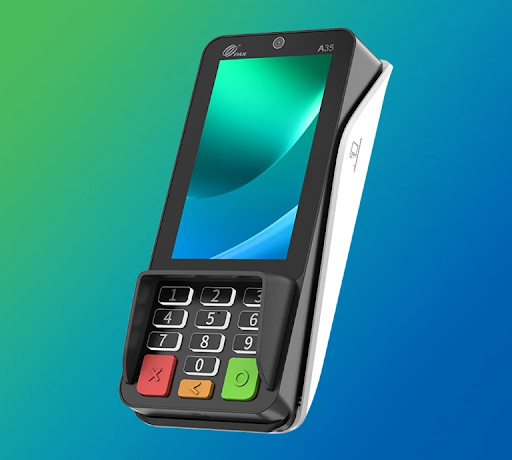
A countertop PIN pad is designed for fixed lanes where speed and reliability matter. Android-based POS terminals can offer a bright touchscreen, a front camera for QR codes, and support for chip, contactless, and wallet payments. Features such as digital signature capture, email receipts, and automatic software updates reduce manual work.
Portable Wireless Models Serve Tableside Service and Market Stalls
Mobile businesses need hardware that follows the sale. Portable models usually offer a larger colour screen, built-in thermal printer, rechargeable battery, and connectivity through Wi-Fi or cellular networks. Pop-up shops, farmers markets, and tableside service all benefit from untethered checkout. Staff can also take payment beside the customer.
Handheld All-in-One Devices Add Scanners and Card Readers Together
Some handheld devices combine a touchscreen, printer, barcode scanner, and card reader in one body. Because these POS terminals connect to the same app marketplace as larger units, software features can travel with staff around a shop floor. This design is useful when queues form quickly or service happens away from the counter.
Security, Connectivity, and Payment Flexibility Features Worth Comparing Before Buying
EMV Certification, PCI Compliance, and Encryption Protect Cardholder Data
Security begins with EMV certification, PCI compliance, and encryption that protects card data in transit. Reliable POS terminals handle these protections automatically, which keeps customers and businesses safer without extra effort at the counter. Owners should still confirm certifications before buying. Ask for documentation when it is unclear.
Cellular Backup and Multiple Payment Methods Keep Sales Moving
Some devices include cellular backup, so transactions continue when Wi-Fi drops during a rush. Wide acceptance matters just as much: chip, tap, swipe, mobile wallets, and EBT can all appear at the same counter. A terminal that supports many methods prevents lost sales from customers who cannot pay in a preferred way.
Dual Pricing, Compatibility, and Support Questions to Settle Early
Dual pricing displays separate cash and card prices to help offset processing fees, and not every device supports it. Compatibility also matters when a business already uses a point of sale system with existing software. Confirming these details with a specialist before purchase avoids surprises and ensures the hardware fits the workflow.
*Final Thoughts *
The right checkout device balances speed, security, and everyday convenience. Providers such as Best Products Sales & Service inc. have supplied payment hardware to small businesses since 1998, which shows how long these needs have existed. Weighing size, features, connectivity, and support before buying leads to a smoother counter experience. A thoughtful decision today keeps every future sale simple.

Best Products Sales & Service, Inc.
Posted on
POS Terminals Explained: Choosing the Right Hardware for Your Store
For further actions, you may consider blocking this person and/or reporting abuse




Top comments (0)