

The right eBay order management tool depends on your volume and channels. If you sell only on eBay with a modest number of daily orders, eBay's free Seller Hub already handles the core workflow: orders awaiting shipment, bulk label printing, automatic tracking upload, returns and feedback rules. Once you sell on several channels, ship high volumes or have a team packing orders, add eBay shop management software that syncs orders and stock across channels, batches labels and routes orders automatically. Either way, the workflow must protect two things: tracking uploaded within your handling time and stock that never oversells.
Below: the workflow, the eBay rules it protects, and a checklist for choosing software or a service.
The eBay Order Management Workflow, Step by Step
Every order moves through seven stages; a weak one shows up later as late shipments or cancellations.
- Capture. A paid order lands in Seller Hub under orders awaiting shipment, the section where you can check the ship-by date, print your shipping labels, and add tracking.
- Verify. Check the address, any buyer notes and whether multiple orders from the same buyer can be combined.
- Allocate stock. Confirm the item is physically available and deduct it from inventory on every channel.
- Pick and pack. Use a packing slip or pick list so the right item, size and variation goes in the box.
- Label and ship. Buy labels in bulk and get a carrier scan within your handling time.
- Upload tracking. With eBay Labels, the tracking number is automatically added to your eBay orders once you print the label.
- After-sale. Handle messages, returns and cancellations, and leave feedback, which Seller Hub can automate with rules.
The eBay Rules Your Order Workflow Must Protect
Good eBay order management isn't just tidiness. eBay measures it every month.
• Ship within your handling time. eBay says sellers are responsible for shipping items within their stated handling time, using the delivery service the buyer selected.
• Get a carrier scan on time. With tracking, eBay counts an item as late only when the delivery scan is after the latest estimated delivery date and there's no carrier scan within your handling time. A same-day scan protects you even if the carrier is slow.
• Keep late shipments low. A high late shipment rate alone won't make you Below Standard, but eBay says a low rate is required for Top Rated status.
• Avoid out-of-stock cancellations. Cancelling because an item isn't in stock counts as a transaction defect.
• Hit Top Rated Plus requirements if you want the badge: listings qualify if you offer same- or 1-business-day handling time and 30-day or longer free returns.
That's why the two non-negotiables in any eBay order management tool are fast, automatic tracking upload and real-time stock sync.
Seller Hub vs eBay Shop Management Software vs a Service
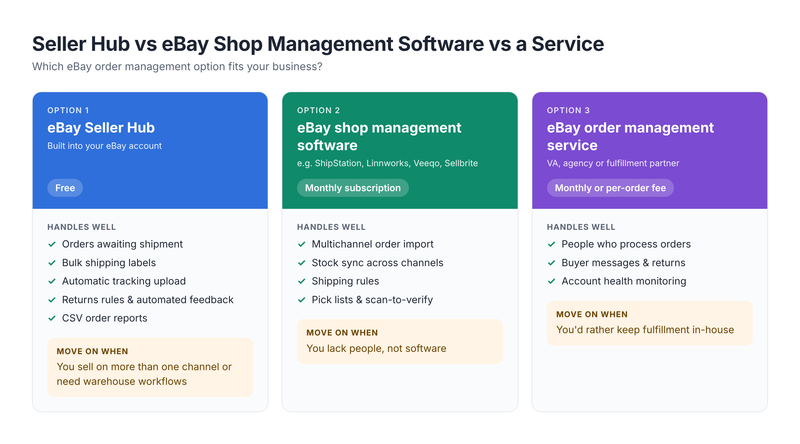
Seller Hub is stronger than many sellers realize. Its bulk shipping tool lets you print labels for multiple orders at once and combine orders per buyer, and the Orders tab lets you set up rules for managing returns and automating feedback.
Software earns its cost when volume or channels multiply. Veeqo, for example, singles out high-volume sellers shipping more than 40 orders a day, or those selling on several channels, as the ones who benefit most. Bear in mind that Veeqo sells this kind of software.
Why eBay Inventory Management Is Half of Order Management
If your eBay quantity says three and your shelf has none, you'll cancel, and the cancellation becomes a defect.
Strong eBay inventory management inside your order workflow means:
• One source of truth for stock, deducted the moment an order lands on any channel.
• SKUs on every listing and variation that match your shelf locations, so pickers can't grab the wrong size.
• Buffer stock on fast sellers, listing slightly fewer than you hold.
• Returns put back into stock only after inspection.
• Daily exception reports for orders awaiting shipment past their ship-by date, and SKUs at zero.
This is the main job multichannel software does better than Seller Hub: it updates eBay, Amazon and your own store from one stock count.
Case Study: From Half a Day to 30 Minutes
The seller: Closeout Inventories, an auto parts retailer listing roughly 10,000 items on eBay and 5,000 on Amazon.
The problem: Order processing needed four team members and took up to half a day. Labels were printed manually, which risked missing expedited shipments, exactly the kind of slip that drives late shipments on eBay.
The fix: The business moved to shipping software (ShippingEasy) with automatic order downloads from both marketplaces, batch label printing and help setting it up.
The results, as reported in the vendor's case study:
• Morning orders now take about 30 minutes to process, down from up to half a day.
• Two employees were freed to work on product and marketing.
What it shows: The gains came from removing manual steps, not working faster. Ask of any eBay order management tool: which steps does it remove completely? Note that this is the vendor's own case study, with no revenue figures or dates published.
eBay Order Management Tool Checklist
Before you subscribe, check that the tool:
- Imports eBay orders automatically, close to real time
- Writes tracking back to eBay automatically after a label is printed
- Prints labels in bulk and combines orders for the same buyer
- Syncs stock across eBay and every other channel you sell on
- Supports SKUs, variations and bundles
- Produces pick lists and packing slips, ideally with barcode scanning
- Applies shipping rules, for example by weight, destination or expedited service
- Handles returns and restocks inventory
- Flags orders close to their ship-by date
- Connects through eBay's official sign-in, not your password
- Offers a free trial and clear per-order or monthly pricing
When an eBay Order Management Service Makes Sense
Software removes manual steps, but someone still has to run it. An eBay order management service (a virtual assistant, an agency or a fulfillment partner) makes sense when:
• Orders regularly sit past their ship-by date because nobody's free to process them.
• Buyer messages go unanswered for more than a day.
• You're adding a second or third channel and can't keep stock aligned.
• Seasonal peaks overwhelm your normal routine.
If you hire one, give access through eBay's Team Access with only the permissions needed, such as viewing orders and adding tracking. Agree on a handling-time target, and review your late shipment and defect rates monthly.
Conclusion
The best eBay order management tool is the simplest one that removes your manual steps. Start with Seller Hub's bulk labels, automatic tracking and returns rules. Move to eBay shop management software once multiple channels or high volume make stock sync and shipping rules essential. Bring in an eBay order management service when people, not software, are the bottleneck. Whatever you use, judge it by two numbers eBay watches every month: on-time tracking and zero out-of-stock cancellations, which depend on solid eBay inventory management.
Frequently Asked Questions
What is the best eBay order management tool?
For eBay-only sellers, the free Seller Hub covers orders, bulk labels, tracking and returns. Multichannel or high-volume sellers usually add software such as ShipStation, Linnworks, Veeqo or Sellbrite.
Can I print eBay shipping labels in bulk?
Yes. In Seller Hub's Orders tab, select two or more orders and use the bulk shipping tool to print labels at once, including combined labels for multiple orders from the same buyer.
Does eBay upload tracking automatically?
Yes, when you buy and print labels through eBay Labels, the tracking number is added to the order automatically. With third-party labels, your software or you must upload it within your handling time.
What counts as a late shipment on eBay?
With tracking, an item counts as late when the delivery scan is after the latest estimated delivery date and there was no carrier scan within your handling time.
What is eBay shop management software?
It's third-party software that connects to your eBay account to manage orders, inventory, listings and shipping, often across several marketplaces at once.







Top comments (0)