

Introduction
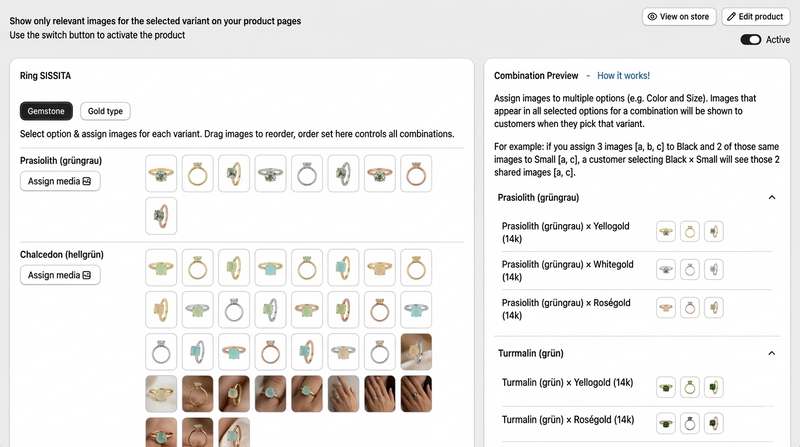
Optimizing multiple variant images Shopify can dramatically improve your store’s product visibility and user experience. Using proper image naming conventions ensures that search engines understand your products while customers find exactly what they’re looking for. With the help of Nova Multiple Variant Images, you can manage your variants efficiently and boost your store’s performance.
Why Image Naming Matters for Shopify Variants
When managing multiple variant images in Shopify, the way you name your images is more than just a cosmetic detail—it directly affects SEO, site speed, and user navigation. Proper naming helps:
Search engine optimization (SEO): Google and other search engines can index your images effectively.
Customer clarity: Clear names make it easier for shoppers to identify the correct variant.
Efficient store management: Simplifies organizing hundreds of variant images, especially if you’re using Nova Multiple Variant Images.
For example, instead of naming a file IMG_1234.jpg, a descriptive name like red-cotton-tshirt-front.jpg tells both the search engine and the customer exactly what the image represents.
Best Practices for Naming Multiple Variant Images Shopify
To make the most of your Shopify variant images, follow these proven naming conventions:
- Include Product Name and Variant Details Incorporate your product’s name and key variant details such as color, size, or style. Example: blue-denim-jeans-size32-front.jpg blue-denim-jeans-size32-back.jpg This ensures that both Google and your customers immediately understand what the image represents.
- Use Hyphens Instead of Underscores Search engines interpret hyphens as word separators, which improves your SEO. Correct: red-leather-jacket-front.jpg Avoid: red_leather_jacket_front.jpg
- Keep Names Short but Descriptive Avoid overly long filenames, but make sure they provide enough detail to differentiate variants.
- Avoid Special Characters and Spaces Characters like &, %, or spaces can break URLs and cause display issues. Stick to letters, numbers, and hyphens.
- Add Contextual Keywords Integrate keywords naturally where possible. For instance, if your product is a “summer dress,” a file like yellow-summer-dress-m-size.jpg can help improve search visibility.
How Nova Multiple Variant Images Enhances Image Naming Efficiency
Managing dozens or hundreds of product variants manually can be overwhelming. This is where Nova Multiple Variant Images comes in. The app allows you to:
Automatically assign consistent naming patterns for variant images.
Link images to the correct product variant seamlessly.
Improve store SEO without manually editing each file.
By implementing Nova Multiple Variant Images, you save time and ensure that every image is optimized for both customers and search engines.
SEO Tips for Shopify Multiple Variant Images
Optimizing image names is just one piece of the puzzle. Consider these additional SEO tips:
- Use Alt Text Wisely Alt text is critical for SEO and accessibility. Describe the variant clearly while including your main keyword naturally. Example: Red cotton t-shirt front view - multiple variant images Shopify
- Leverage Structured Naming Keep naming consistent across all product images. This helps Google understand relationships between variants.
- Optimize Image Size Large image files slow down your store. Compress images without sacrificing quality to maintain fast loading times.
- External Linking When possible, link your Shopify product images or pages back to authoritative sources like Shopify to improve credibility and SEO signals.
Common Mistakes to Avoid
Even experienced store owners often fall into image naming pitfalls. Avoid:
Using vague names like image1.jpg or variant2.png.
Mixing multiple languages in filenames.
Forgetting to update image names when product variants change.
Overstuffing keywords, which can look spammy to Google.
Using Nova Multiple Variant Images, you can systematically prevent these errors while keeping your store organized and professional.
Practical Workflow for Image Naming
Here’s a simple step-by-step process to streamline your image naming for Shopify:
Identify variant attributes: Color, size, material, style.
Follow a consistent order: e.g., [color]-[material]-[product-name]-[view].jpg
Rename images before uploading: Prevents conflicts and keeps Shopify organized.
Use Nova Multiple Variant Images to automate linking: Saves hours of manual work.
Check alt text and SEO: Ensure keywords are naturally included.
This workflow ensures that multiple variant images Shopify are optimized from the start, reducing errors and improving store visibility.
Advanced Tips for High-Volume Stores
For stores with hundreds of variants, automation is key. Consider:
Batch renaming tools to apply consistent naming conventions.
CSV uploads with proper image links to maintain structure.
Integration with Nova Multiple Variant Images to automate variant-image assignments and reduce human error.
By following these advanced strategies, even large Shopify stores can maintain impeccable image SEO without slowing down workflow.
Conclusion
Proper image naming is a crucial yet often overlooked aspect of Shopify store optimization. By implementing these multiple variant images Shopify naming tips and leveraging Nova Multiple Variant Images, you can improve SEO, enhance customer experience, and save valuable time. Optimize your images today and see your store performance soar!





Top comments (0)