

Choosing an employee monitoring platform is not simply about finding software that records working hours. Businesses increasingly need a clearer understanding of how employees spend time, where workflows slow down, and whether workloads are distributed effectively. This makes the Time Doctor vs Insightful comparison relevant for companies managing remote, hybrid, or distributed teams.
Both platforms provide time tracking, employee activity monitoring, attendance information, productivity reporting, and visibility into websites and applications. However, the way these capabilities are configured and presented can influence which solution fits a particular organization. Time Doctor currently emphasizes time tracking, workforce analytics, employee visibility, attendance, and workload insights, while Insightful focuses strongly on productivity tracking, activity monitoring, time and attendance, screenshots, and application and website usage.
The right choice therefore depends less on the number of features and more on what your managers actually need to understand about work.
Time Doctor vs Insightful: Where the Platforms Overlap
At a basic level, both tools are designed to give organizations greater visibility into employee work patterns. Time Doctor can track projects and tasks, work hours, application and website usage, idle time, and optional screenshots or video recordings. Its reporting environment is also designed to help managers understand workload, attendance, and productivity trends.
Insightful provides similar visibility through activity tracking, application and website monitoring, screenshots, active and idle time, productivity reports, timekeeping, and attendance tracking. It also provides productivity labels that allow organizations to categorize applications and websites according to their relevance to work.
For example, imagine a remote customer support team that appears to be working its scheduled hours but is regularly missing service targets. Either platform can provide additional context around time usage and activity. The important question is what managers do with that information. Monitoring should ideally help identify workload problems, process bottlenecks, or training needs rather than simply create more pressure for employees.
Comparing Time Tracking and Attendance
Time Doctor
Time Doctor provides time tracking across projects, tasks, and employees, along with attendance monitoring and scheduling information. Its current attendance functionality can show start and end times, actual hours compared with expected hours, and team attendance status.
This can be particularly useful for businesses that need reliable records for payroll, project accounting, client billing, or workforce planning.
Insightful
Insightful also combines time and attendance tracking with employee activity data. Its platform supports manual time entries, automatic attendance tracking, timekeeping, and productivity reporting. Its visible mode allows employees to start and stop tracking, while its stealth mode can collect activity automatically on configured company computers.
For organizations comparing these platforms, it is worth examining not only whether time tracking exists, but also how employees interact with the system and how much control administrators have over tracking behavior.
Employee Monitoring and Privacy Considerations
Employee monitoring can become counterproductive when workers feel that every action is being watched without context. A better approach is to establish clear policies explaining what is tracked, when tracking occurs, who can access the information, and how the data will be used.
Time Doctor states that its tracking can include task time, application and website usage, activity levels, and optional screen captures while tracking is active. Its documentation also explains that actual keystrokes are not recorded, although keyboard and mouse activity can be used to measure activity levels.
Insightful offers visible and stealth tracking modes. In visible mode, employees can interact with the application and access their own productivity information, while stealth mode allows activity tracking to operate in the background.
The practical lesson is simple: before choosing either platform, define your organization's monitoring policy first. Technology should support accountability and operational improvement, not replace effective management.
Which Platform Makes Sense for Remote Teams?
Remote teams often need more than simple clock in and clock out functionality. Managers may need to understand attendance, application usage, project time, idle periods, workload distribution, and productivity trends without relying entirely on meetings or manual reports.
Time Doctor positions its workforce analytics around understanding workload, productivity, time distribution, and team performance. It also provides employee visibility features designed to help managers understand work across applications, websites, and workflows.
Insightful similarly provides remote workforce visibility through activity data, screenshots, application and website tracking, attendance information, and productivity reports. Its documentation specifically describes visible tracking as an option for remote employees using personal computers, helping employees control when tracking starts and stops.
A distributed marketing agency, for example, may use these insights to determine whether a project is taking longer because of employee performance, unrealistic deadlines, inefficient processes, or excessive administrative work. That distinction is more valuable than simply knowing whether someone was active for eight hours.
Time Doctor Alternatives and Broader Workforce Management
A Time Doctor alternative may be worth considering when your organization wants a different combination of time tracking, attendance, productivity analytics, project management, or workforce management capabilities.
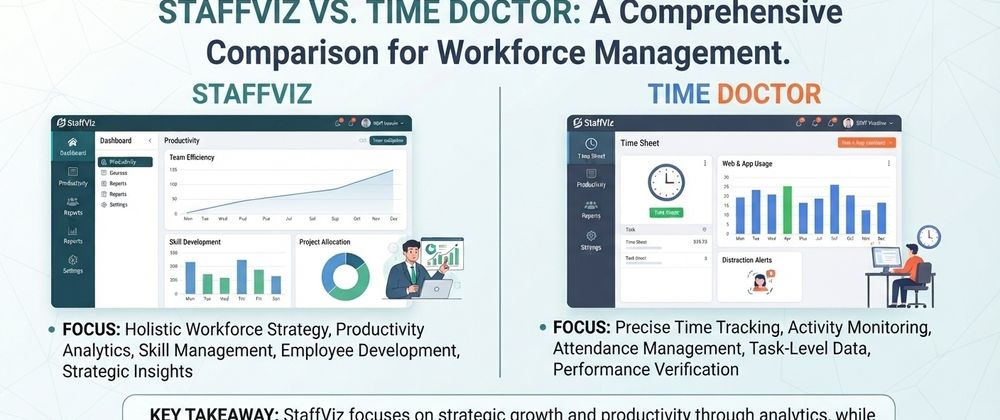
One option to explore is StaffViz, which provides workforce productivity and time tracking capabilities including work hour tracking, attendance information, active and idle time, breaks, tasks, projects, and productivity insights.
The broader point is that businesses should compare platforms according to their actual workflows rather than selecting software solely because it has the longest feature list. A company managing client projects may prioritize project and task tracking, while an organization managing shift based teams may place greater importance on attendance and scheduling.
How Should You Compare Time Doctor and Insightful?
A useful Time Doctor vs Insightful comparison should begin with your operational requirements. Start by identifying whether your priority is accurate time records, employee activity visibility, project tracking, attendance, workforce analytics, remote team management, or a combination of these needs.
Next, consider how comfortable your employees are with monitoring. Features such as screenshots, activity tracking, automatic monitoring, and application usage can provide valuable context, but they should be introduced with transparent policies and appropriate privacy controls.
Finally, test the reporting experience. Data is only useful when managers can understand it quickly and turn it into practical action. If a dashboard produces hundreds of metrics but does not help a manager identify a workload problem, attendance issue, or process bottleneck, its value may be limited.
Conclusion
The Time Doctor vs Insightful decision ultimately comes down to how your organization defines productivity and workforce visibility. Time Doctor offers a broad combination of time tracking, attendance, employee visibility, activity monitoring, workforce analytics, and workload insights. Insightful provides extensive productivity monitoring through time and attendance tracking, application and website usage, screenshots, activity data, and productivity reporting.
Rather than choosing based only on feature counts, evaluate each platform against your team's workflow, privacy expectations, reporting requirements, management style, and operational goals. If you are also researching alternatives, consider broader employee monitoring software solutions such as StaffViz to determine which approach aligns with your workforce management needs.
The best platform is ultimately the one that turns workforce data into useful insights while maintaining transparency and helping managers make better decisions.
FAQs
- What is the main difference between Time Doctor and Insightful?
Both provide time tracking and employee monitoring, but their feature sets and approaches differ. Time Doctor emphasizes workforce analytics, time and attendance, workload visibility, and employee activity, while Insightful emphasizes productivity tracking, activity monitoring, screenshots, application and website usage, and productivity reporting.
- Does Time Doctor track employee applications and websites?
Yes. Time Doctor can track websites and applications used during tracked work periods when the relevant functionality is enabled.
- Does Insightful offer screenshots and employee activity tracking?
Yes. Insightful provides screenshots, activity tracking, application and website usage monitoring, and active and idle time information as part of its employee monitoring capabilities.
- Which Time Doctor alternatives should businesses consider?
Businesses should consider alternatives based on their requirements for time tracking, attendance, productivity analytics, project management, employee monitoring, and workforce reporting. StaffViz is one platform worth evaluating alongside other solutions.
- Can Time Doctor monitor employee attendance?
Yes. Time Doctor provides attendance tracking that can show employee start and end times, attendance status, expected versus actual hours, and related scheduling information.
- Does Insightful have visible and automatic monitoring options?
Yes. Insightful supports visible tracking and stealth tracking modes. The available mode depends on the tracking configuration and device setup.
- Is employee monitoring suitable for remote teams?
It can be useful when implemented transparently and for clearly defined business purposes. Time tracking, attendance, workload, and productivity information can help remote managers identify operational issues without relying entirely on physical presence.
- What should businesses check before choosing employee monitoring software?
Businesses should evaluate tracking controls, privacy settings, reporting capabilities, attendance features, project tracking, application and website monitoring, integrations, ease of adoption, and how the collected data will actually be used to improve operations.






Top comments (0)