

CRM data migration is often treated like a finish line — once the records appear in the new system, everyone celebrates and moves on. But seeing customer records in a new CRM does not necessarily mean the migration succeeded.
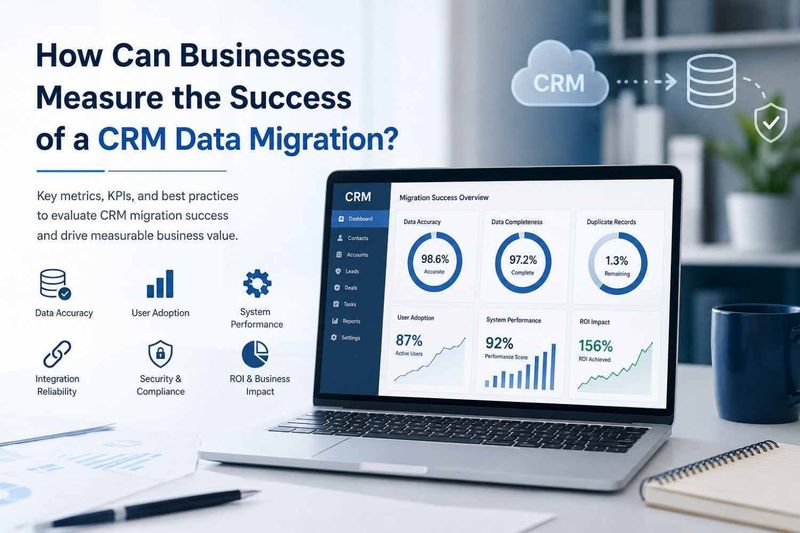
A successful migration should preserve data accuracy, improve accessibility, maintain business continuity, and help employees work more efficiently. We recommend measuring the migration against clear business and technical KPIs rather than relying on a simple “data transferred” report.
In this guide, we explore the key metrics businesses can use to determine whether their migration delivered the expected results.
What Does CRM Data Migration Success Actually Mean?
CRM Data Migration success means more than transferring records from one database to another. It means the information arrives correctly, remains usable, and supports the workflows the business depends on.
A successful migration should answer several practical questions:
Was the data transferred completely?
Were customer records mapped correctly?
Were duplicates removed?
Are integrations working?
Can employees use the new CRM effectively?
Has productivity improved?
Was business disruption minimized?
Did the migration deliver a measurable return on investment?
These questions give businesses a much clearer picture of migration performance.
1. Set Clear CRM Migration KPIs Before Starting
The easiest way to measure success is to define what success looks like before migration begins.
Businesses should establish baseline measurements from the existing CRM and compare them with results after migration.
Useful KPIs include:
Data accuracy rate
Data completeness rate
Duplicate record percentage
Migration error rate
System downtime
CRM response time
User adoption rate
Workflow completion time
Integration failure rate
Operational cost savings
Return on investment
Without baseline numbers, post-migration reporting can become a guessing game — and business decisions should involve fewer guesses than a Monday morning meeting usually does.
2. Measure Data Accuracy and Completeness
Data quality is one of the strongest indicators of migration success.
After migration, businesses should compare records from the old system with those in the new environment. This validation should cover customer names, email addresses, phone numbers, addresses, transaction histories, notes, tags, custom fields, and other critical information.
For example, if the old CRM contained 100,000 customer records and only 98,500 valid records appear after migration, the missing 1,500 records need investigation.
Businesses should track:
Data accuracy = Correct migrated records ÷ Total migrated records × 100
The goal is not simply to move more data. The goal is to move trustworthy data.
3. Track Duplicate and Redundant Records
Duplicate records can quietly damage CRM performance.
A migration may accidentally create multiple customer profiles because of inconsistent email addresses, phone numbers, company names, or legacy records.
Businesses should measure duplicate records before and after migration.
For example:
Before migration: 8% duplicate records
After cleansing and migration: 1.5% duplicate records
That improvement represents a meaningful data-quality gain.
Deduplication also helps sales and customer service teams avoid contacting the same customer multiple times or working with conflicting information.
4. Evaluate Data Mapping and Field Integrity
Data mapping determines where information from the old CRM goes inside the new system.
A simple field such as “Customer Email” may be straightforward. Custom fields, relationships, tags, lead statuses, sales stages, and historical activities can be considerably more complicated.
Businesses should verify:
Field mapping
Data types
Custom fields
Relationships
Tags
Status values
Customer histories
Attachments
Notes
Workflow triggers
A technically completed migration can still be unsuccessful if important information lands in the wrong place.
5. Monitor CRM Performance After Migration
The new CRM should perform at least as well as — and ideally better than — the previous system.
Businesses should monitor:
Page-load times
Search speed
Report generation
Dashboard performance
API response times
Workflow execution
Integration performance
System availability
If employees previously waited 20 seconds for a report and now wait 45 seconds, the migration has introduced a productivity problem even if every customer record arrived safely.
Performance should therefore be measured before and after migration.
6. Measure User Adoption and Productivity
A CRM can be technically perfect and still fail spectacularly if employees avoid using it.
This is why user adoption should be part of the migration scorecard.
Businesses can monitor:
Daily and weekly active users
Login frequency
Feature usage
Record updates
Workflow adoption
Report usage
Task completion
Employee feedback
We have seen a common pattern in software projects: teams may initially complain about a new system, but once the right workflows are configured and unnecessary manual work disappears, adoption improves quickly.
The lesson is simple — migration success should be measured by how people actually use the CRM, not just how the CRM looks in a technical report.
7. Measure Business Productivity Before and After Migration
Migration should ultimately support business performance.
Businesses can compare pre-migration and post-migration metrics such as:
Lead response time
Sales cycle duration
Customer support resolution time
Administrative workload
Reporting time
Manual data-entry hours
Follow-up completion rates
Sales team productivity
For example, if employees previously spent five hours every week preparing reports and the new CRM reduces that workload to two hours, the migration has created a measurable productivity benefit.
These numbers make the business case much stronger than simply saying, “The new CRM feels better.”
8. Track Downtime and Business Disruption
Migration inevitably involves some operational risk. The objective is to control it.
Businesses should compare planned downtime with actual downtime and document operational interruptions.
Important measurements include:
Total downtime
Delayed processes
Failed transactions
Missed leads
Delayed customer responses
Interrupted integrations
Employee productivity loss
A migration that takes slightly longer but keeps business operations stable may be more successful than a faster migration that creates several days of operational chaos.
9. Evaluate Integration Success
Modern CRM platforms rarely work alone.
They may connect with:
ERP systems
Marketing platforms
Accounting software
Email platforms
Customer support systems
Payment systems
Analytics tools
Internal applications
Third-party APIs
After migration, businesses should verify that information flows correctly between connected systems.
Track:
Successful synchronization rate
API errors
Failed workflows
Delayed synchronization
Missing records
Authentication failures
A CRM may appear healthy while an integration quietly fails in the background — which is exactly the kind of surprise nobody wants after migration day.
10. Measure Security and Compliance Outcomes
CRM data often contains sensitive customer and business information. Migration should therefore be evaluated from a security perspective as well.
Businesses should verify:
User permissions
Role-based access
Authentication controls
Data encryption
Audit logs
Backup availability
Access restrictions
Compliance requirements
The objective is to ensure that migrated data is not only accurate but also protected.
A successful migration should never trade better usability for weaker security.
11. Calculate the ROI of CRM Data Migration
At some point, management will ask the unavoidable question: “Was the migration worth the money?”
That question should be answered with numbers.
Businesses can compare migration costs against benefits such as:
Reduced manual work
Lower software maintenance costs
Improved employee productivity
Reduced duplicate records
Faster reporting
Better sales performance
Reduced support workload
Lower operational expenses
A basic calculation is:
CRM Migration ROI = (Financial Benefits − Migration Cost) ÷ Migration Cost × 100
For example, if a migration costs $50,000 and generates $80,000 in measurable annual benefits:
ROI = ($80,000 − $50,000) ÷ $50,000 × 100 = 60%
This gives decision-makers a clearer financial picture.
12. Conduct a Post-Migration Data Quality Audit
Migration validation should not stop immediately after launch.
A structured post-migration audit can evaluate:
Accuracy
Completeness
Consistency
Uniqueness
Validity
Timeliness
Businesses should also maintain an issue log containing identified problems, their causes, priority levels, and resolution status.
This approach turns migration from a one-time technical activity into an ongoing data-quality program.
13. Gather Feedback From CRM Users
Numbers tell one part of the story. Employees tell another.
Sales representatives may discover that an important field is difficult to find. Customer support teams may notice missing conversation histories. Managers may discover that reports no longer contain the information they previously relied on.
Collect feedback from different departments, including:
Sales
Marketing
Customer service
Finance
Operations
Management
Combining quantitative metrics with employee feedback gives businesses a much more complete view of migration success.
14. Create a CRM Migration Success Scorecard
A simple scorecard can make post-migration evaluation easier.
Metric Target Result Status
Data accuracy 99%+ 99.4% Successful
Data completeness 98%+ 98.7% Successful
Duplicate records <2% 1.2% Successful
System uptime 99.9% 99.95% Successful
User adoption 90%+ 87% Needs improvement
Integration success 99%+ 99.3% Successful
Reporting efficiency 30% improvement 42% Successful
Migration ROI Positive 60% Successful
This makes it easier for leadership teams to understand where the migration performed well and where additional optimization is required.
15. How a Custom CRM Software Development Company Can Help
Businesses with complex CRM environments may need more than a basic migration tool.
A custom CRM software development company can help with:
CRM architecture assessment
Data mapping
Data cleansing
Custom migration scripts
Deduplication
API development
Integration testing
Data validation
Security configuration
Post-migration monitoring
Custom development becomes especially useful when businesses have legacy databases, highly customized CRM fields, multiple integrations, or unique workflows that standard migration tools cannot handle effectively.
The objective is not merely to move data — it is to make the new CRM fit the way the business actually operates.
16. Common Mistakes When Measuring CRM Migration Success
Several mistakes can make migration reporting misleading.
Measuring only migrated records
Moving 100% of records does not prove that 100% of the data is accurate.
Ignoring user adoption
A system that employees refuse to use cannot deliver its expected value.
Forgetting the baseline
Without pre-migration measurements, businesses cannot accurately demonstrate improvement.
Ignoring integrations
A CRM can appear successful while connected systems are producing synchronization errors.
Stopping measurement after launch
Some migration problems appear weeks after implementation. Continuous monitoring is therefore important.
Focusing only on technical performance
Business outcomes matter just as much as technical outcomes.
17. CRM Data Migration Success Checklist
Before declaring a migration successful, businesses should verify:
Data accuracy has been validated
Missing records have been investigated
Duplicate records have been reduced
Data fields are correctly mapped
Custom fields work correctly
Integrations have been tested
CRM performance meets expectations
User adoption is being monitored
Security permissions are correct
Downtime stayed within acceptable limits
Business productivity has been measured
Post-migration issues are documented
ROI has been calculated
Long-term data governance is established
Conclusion
Measuring CRM migration success requires looking beyond the number of records transferred.
The strongest evaluation combines data quality, system performance, user adoption, integration reliability, security, productivity, business continuity, and ROI. When these metrics are tracked before and after migration, businesses can clearly understand whether the new CRM is delivering meaningful improvements.
A migration should ultimately make business data easier to trust and easier to use. If employees can work faster, customers receive better service, managers get more reliable information, and the business sees measurable value — that is when we can confidently call the migration successful.
And perhaps that is the best migration metric of all: the new CRM works so well that nobody misses the old one.
FAQs
How do businesses know if a CRM migration was successful?
A successful migration should demonstrate accurate and complete data, reliable system performance, working integrations, strong user adoption, minimal disruption, improved productivity, and measurable business value.
What are the most important CRM migration KPIs?
Important KPIs include data accuracy, completeness, duplicate reduction, migration errors, downtime, system performance, user adoption, integration reliability, productivity improvements, and ROI.
How can CRM data quality be measured after migration?
Businesses can compare source and destination records, validate important fields, identify duplicates, check missing information, test relationships, and conduct post-migration data-quality audits.
Why is user adoption important after CRM migration?
User adoption determines whether employees actually benefit from the new system. Low adoption can indicate poor training, complicated workflows, missing features, or usability problems.
How long should businesses monitor CRM migration performance?
Businesses should validate the system immediately after migration and continue monitoring it during the stabilization period. Some data and workflow issues may only become visible after employees begin using the system regularly.
Can CRM migration ROI be measured?
Yes. Businesses can compare migration costs against savings from reduced manual work, improved productivity, lower maintenance expenses, faster reporting, and other measurable business benefits.
What should businesses do if data quality drops after migration?
They should identify the source of the problem, review mapping and cleansing rules, correct affected records, validate the changes, and introduce ongoing data-quality monitoring.







Top comments (0)