

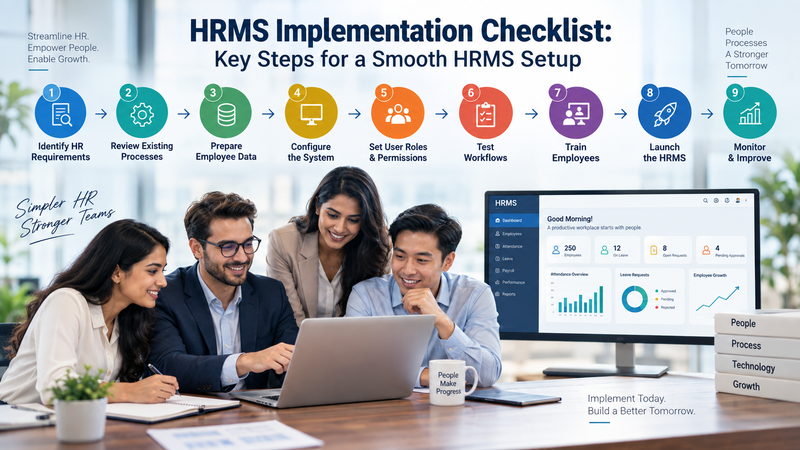
Human resource management involves many activities, from employee information and attendance to leave management, payroll coordination and reporting. As organisations grow, managing these processes manually or across multiple disconnected systems can become difficult.
A Human Resource Management System (HRMS) can bring different HR processes together within a centralised digital platform. However, selecting HRMS software is only one part of the process. Proper planning and implementation are also important for organisations looking to introduce an HRMS successfully.
What Is HRMS Implementation?
HRMS implementation refers to the process of introducing HR management software into an organisation and configuring it according to business and workforce requirements.
The process can involve:
- Understanding HR requirements
- Selecting an appropriate HRMS
- Preparing employee data
- Configuring HR modules
- Setting user permissions
- Migrating data
- Testing workflows
- Training employees
- Launching the system
- Monitoring the system after implementation
A structured implementation process can help organisations reduce confusion and make the transition easier for HR teams and employees.
Step 1: Identify HR Requirements
Before implementing an HRMS, an organisation should understand its current HR processes.
Start by identifying the activities that need to be managed digitally.
These may include:
- Employee records
- Attendance
- Leave management
- Payroll
- Recruitment
- Performance management
- Employee self-service
- HR reporting
Understanding these requirements helps organisations determine which HRMS modules and capabilities they actually need.
Step 2: Review Existing HR Processes
An HRMS should support business processes rather than simply replace existing paperwork with software.
Organisations can document how HR activities currently work and identify areas where processes are repetitive, time-consuming or difficult to track.
For example, an organisation can review how employees request leave, how managers approve requests and how HR maintains records.
This process analysis can help during HRMS configuration.
Step 3: Select the Required HRMS Modules
HRMS platforms can include different modules depending on the product.
Common modules may include:
- Employee management
- Attendance management
- Leave management
- Payroll
- Recruitment
- Performance management
- Employee self-service
- HR analytics
- Reporting
Organisations should select modules according to their actual requirements rather than implementing unnecessary functionality.
A detailed overview of HRMS modules can be found here:
https://mhcognition.com/blogs/hrms-modules-explained
Step 4: Prepare Employee Data
Employee data is an important part of HRMS implementation.
Before migrating information into the new system, organisations should review their existing employee records and identify outdated, incomplete or duplicate information.
Data preparation can include:
- Employee names
- Contact information
- Employment details
- Department information
- Attendance records
- Leave information
- Payroll-related information
Organised data can make the migration process easier and reduce potential errors.
Step 5: Configure the HRMS
Once requirements and data are prepared, the HRMS can be configured according to the organisation's workflows.
Configuration may involve:
- Departments
- Employee roles
- Reporting structures
- Approval workflows
- Leave policies
- Attendance rules
- User permissions
- Notifications
- Reporting requirements
The exact configuration will depend on the HRMS platform and the organisation's policies.
Step 6: Set User Roles and Permissions
Not every employee needs access to the same HR information.
Organisations should establish appropriate user roles and permissions.
For example:
- Employees may access their own information.
- Managers may manage team-related requests.
- HR teams may access broader employee records.
- Administrators may manage system settings.
Clear access controls can help organisations manage HR information appropriately.
Step 7: Test the System
Testing should take place before the HRMS is introduced across the organisation.
HR teams can test important workflows such as:
- Employee onboarding
- Attendance
- Leave requests
- Approval processes
- Employee updates
- Reporting
- Payroll-related workflows
Testing allows organisations to identify configuration issues before employees begin using the system.
Step 8: Train HR Teams and Employees
Even a well-configured HRMS requires users to understand how it works.
Training can be provided to HR teams, managers and employees based on their roles.
Training can cover:
- Login and navigation
- Employee information
- Leave requests
- Attendance
- Approvals
- Reports
- Employee self-service
Simple documentation and demonstrations can also help employees become comfortable with the new system.
Step 9: Launch the HRMS
After testing and training, organisations can move toward implementation.
Some organisations may choose a phased rollout, while others may introduce the system across the organisation at once.
A phased approach can allow teams to identify issues and make adjustments before expanding the system to additional departments.
Step 10: Monitor and Improve
HRMS implementation should not necessarily end when the system goes live.
HR teams can continue monitoring:
- User adoption
- System performance
- Workflow issues
- Employee feedback
- Reporting requirements
- Process efficiency
Regular reviews can help organisations identify areas for improvement.
Important HRMS Features to Consider
Before implementing an HRMS, organisations should understand the features available within the selected platform.
Important areas can include:
- Employee management
- Attendance tracking
- Leave management
- Payroll integration
- Performance management
- Reporting
- Employee self-service
- User access controls
Organisations can learn more about common HRMS capabilities here:
https://mhcognition.com/blogs/hrms-system-features
Why Cloud-Based HRMS Can Be Considered
Cloud-based HRMS platforms can provide organisations with access to HR software through internet-connected devices.
Depending on the platform, cloud-based systems can support distributed teams and reduce the need for organisations to maintain certain on-premise infrastructure.
However, organisations should evaluate security, access controls, integrations, support and data management before selecting a cloud HRMS.
Learn more about cloud-based HRMS:
https://mhcognition.com/blogs/cloud-based-hrms-software
MH Cognition and HR Management Solutions
MH Cognition provides technology solutions designed to support organisations across different business functions.
Its MH Connekt platform focuses on HR management and can help organisations explore digital approaches to managing workforce-related processes.
Organisations interested in exploring the solution can visit:
https://mhcognition.com/connekt
HRMS Implementation Checklist
Before going live, organisations can review the following checklist:
- [ ] HR requirements identified
- [ ] Existing processes reviewed
- [ ] Required modules selected
- [ ] Employee data cleaned
- [ ] Data migration planned
- [ ] HRMS configured
- [ ] User roles created
- [ ] Workflows tested
- [ ] Employees trained
- [ ] System launched
- [ ] User feedback collected
- [ ] Post-launch improvements planned
Conclusion
Successful HRMS implementation requires more than selecting software. Organisations need to understand their HR processes, prepare employee data, configure workflows, establish user permissions, test the system and train employees.
A structured implementation approach can help HR teams introduce digital HR processes more effectively and create a better experience for employees and administrators.
Organisations exploring HR management software can also review solutions such as MH Cognition's MH Connekt:
https://mhcognition.com/connekt







Top comments (0)